
TIA Portal Sync
Link a PLC folder to its TIA Portal project to compare, import, export and download.
On Windows machines with TIA Portal V21 Openness, the extension can keep an exported PLC folder in sync with the TIA project it came from.
If a user-started operation finds a missing or stale Openness AllowList entry, the extension automatically runs plccheck tia trust --install. Accept the Windows administrator prompt; the extension then retries the original operation once. Declining the prompt stops the operation. Background status checks do not request administrator access.
Run TIA Portal: Link Folder to TIA Portal Project… from the command palette. Pick a project that is open in TIA Portal (or browse for an
.ap21), pick the PLCs, and choose where the PLC folders are created. Each PLC is exported into its own folder with a.plc.jsonthat records the link:{ "name": "PLC_1", "tia": { "project": "C:\\Projects\\Demo\\Demo.ap21", "plc": "PLC_1" } }Keep the folder named after the PLC: the bridge identifies the PLC from the folder that contains
Program blocks, so a renamed folder cannot be compared or imported. For the same reason a PLC whose name contains characters that are not allowed in folder names (such as/or:) cannot be linked; rename it in TIA Portal first. Link to a.ap21project, not a.zap21archive; the bridge saves into an extracted copy of an archive, so imports into an archive would be lost.A TIA: PLC_1 status bar item shows whether the linked project is open in a running TIA Portal. Click it for the full action list.
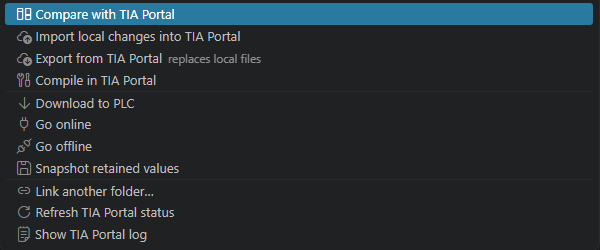
Compare with TIA Portal (status bar, Source Control view, Explorer context menu, or editor title) compares the local files with the live project. A block whose
.s7restexts changed since the last sync counts as changed locally (the sidecar records a hash of the texts), since the texts are imported together with the block; if TIA also changed the block, it is listed as a conflict. Results appear in the Source Control view under aTIA Portalprovider with the groups Conflicts, Local Changes, Changed in TIA Portal, and Unknown. Click a file to open a diff editor whose left side is read from TIA Portal..s7dclfiles open as a graphical comparison.Import into TIA Portal compares first and imports only files that are safe: changed locally and unchanged in TIA. A file whose TIA object was deleted or moved since the last export is held back as well, since importing it would recreate the object. Everything else stays listed so you decide per file with the inline actions Import into TIA Portal (Overwrite) or Replace Local File with TIA Portal Version. After an import the local file is refreshed with the source TIA generated from it (TIA re-indents and normalizes layout), so the exported folder always holds TIA's canonical form of each block.
Export from TIA Portal replaces the local TIA-owned files with the current project contents and removes TIA-owned files (those with a
.meta.jsonsidecar) that no longer exist in the project. New local files without metadata are kept, including a local-only source that shares its name with a TIA block; when TIA exports an object to exactly the path of such a file, the local content is kept beside it with a.localsuffix. The same happens to a file you save while the export is running: TIA Portal's version wins and your saved text is kept as.local. Project-library definitions are written to aTypesfolder next to the PLC folder, the same layoutplccheck tia exportuses so.liblinkplaceholders resolve. Files inTypeswithout an exporter baseline (a.libinfo/.libintpair or metadata sidecar with the same name) are local-only and are never pruned. Because every PLC folder in a destination shares thatTypesfolder, one destination folder holds the PLCs of one TIA project; linking or exporting refuses a destination whose other PLC folders are linked to a different project. Compile in TIA Portal runs a TIA compile and publishes its errors and warnings in the Problems panel against the exported files.Download to PLC, Go Online, Go Offline, and Snapshot Retained Values to Start Values run the corresponding device actions. Download and snapshot ask for confirmation first. If the PLC needs credentials, set
siemensTia.online.authType,siemensTia.online.user, andsiemensTia.online.passwordEnv(the name of an environment variable holding the password).
Compare exports the PLC with the direct exporter and checks it against the local sources and their last synchronization baseline, including .s7res texts. It does not need TIA checksums or a compile. Imports still use Openness and recheck the current TIA content before overwriting. See direct comparison for CLI options and conflict handling.
The source control view refreshes automatically when the linked project's saved data changes. Background comparisons leave local files and unsaved TIA edits untouched; the Compare button remains available for a manual refresh.
All operations run one at a time through plccheck tia, show progress in a cancellable notification, and log every event in the Siemens TIA Portal output channel. When TIA Portal refuses an import because it would detach a project-library instance, the error offers Repair Library Dependencies….